3D Geospatial Engine

3D Geospatial Engine

After a short break from updating the blog, and the reason behind it.

One of the core components in developing a flight simulator is building and streaming a 3D world around the player. This is one of the systems I have invested the most time in so far, and one that went through countless iterations to meet the game’s performance requirements. It became overly complicated, was simplified, dismantled, and rebuilt from scratch.
Greener Grass!

Greener Grass!

Is the grass greener on the other side? Maybe.

I went to play with a real game engine.

I tried Bevy, which is written in Rust and has a thriving community around it. The engine is essentially a combination of an ECS and a rendering engine, the two parts that even in my C++ version I didn’t write myself (raylib for rendering and entt for ECS).

With the kind help of an LLM that explained and guided me step by step (thanks Gemini), and with the help of the avian plugin (a physics engine), I reached a result in a few hours that is close to what took me weeks, sweat, and tears to achieve working with raylib and C++.

Refucktoring

Refucktoring

I hit a dead end.

I defined various entities and started thinking about how I was going to manage them all. Do I need them all to implement a fixed API so I can handle every entity from a single loop? Slowly but surely, I started to realize the magnitude of the problem I had gotten myself into.

I opened a new chat with Gemini and brought up the issue. “What’s the problem?” it wondered, pointing out that the industry has been working with ECS for years. “Explain ECS to me,” I asked, and received more information than I needed, but with one key takeaway: I have to migrate to ECS.

Thrust the Force

Thrust the Force

Now that we have a land to move on, we can start handling the cruelest element of all: physics.

Let’s talk about the forces that act on an aircraft. The main forces are:

  • Thrust: the force that propels the aircraft forward, generated by the engines.
  • Drag: the force that opposes the motion of the aircraft, generated by air resistance.
  • Lift: the force that opposes the weight of the aircraft, generated by the wings.
  • Weight: the force that pulls the aircraft down, generated by gravity.

In order to simulate the physics of the aircraft, we need to calculate these forces and apply them to the plane.

Resource Micro Management

Resource Micro Management

In this post, I’m taking a brief break from graphics to talk about under-the-hood architecture-specifically, how I handle resources in my game. By “resources,” I mean all the external assets the game relies on, such as textures, models, and sounds.

Raylib provides a straightforward way to load and manage resources, but because it’s a C library, you have to manually unload every single resource when you are done with it. This can be tedious and highly error-prone, leading to memory leaks if you have a lot of assets to juggle.

Textures From The Sky

Textures From The Sky

We left off the last post with a beautiful 3D terrain, but it had a bit of a flaw. We ran into a problem with coloring flat plains that happen to sit at or below sea level, they were incorrectly painted as water. In this post, we will solve that problem and apply the final texture to our terrain.

heightmap and colormap

The main issue was that we tried to automatically generate the colors for our terrain based solely on the height of each point, without any context of whether it was actually sea or land.

Coloring Book

Coloring Book

In this post, we will continue building our world by adding colors and textures to our terrain. We will also explore how to use heightmaps to create a more compelling landscape.

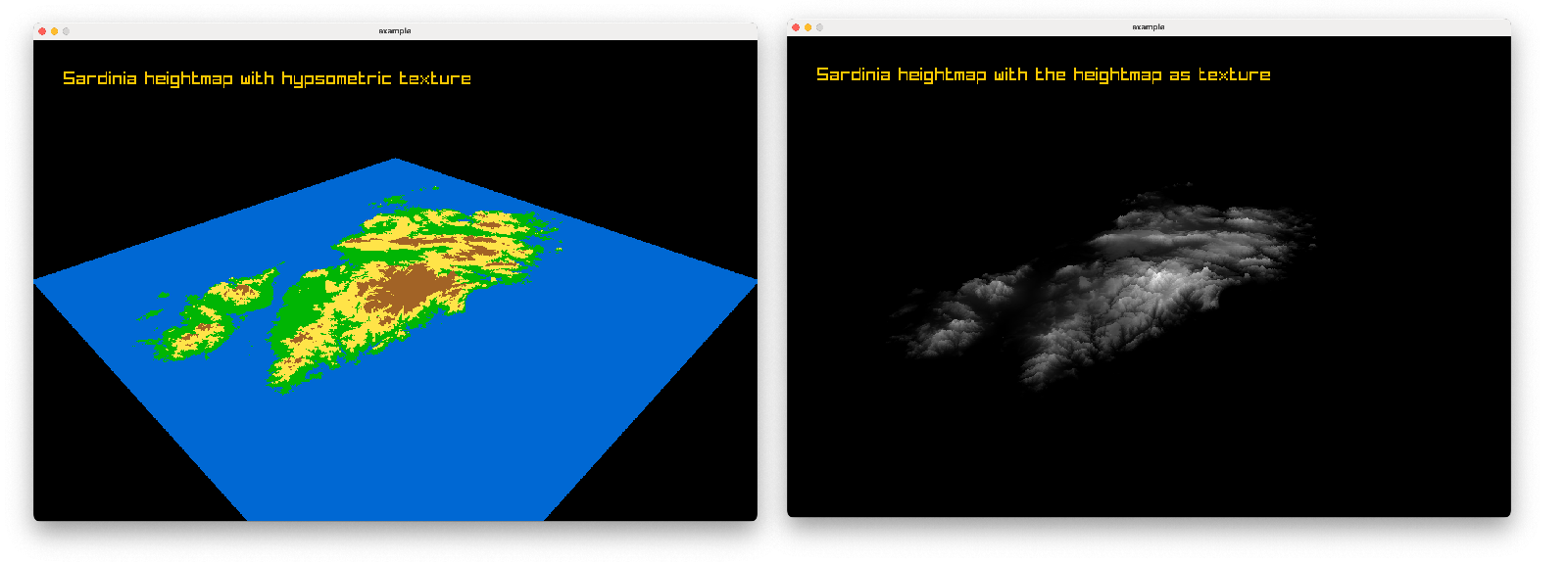
First, I owe you a better render of the results from the previous post. I wasn’t entirely happy with the way the terrain looked in the video, so here it is again, this time as a high-quality image. The gray clouds you see are simply the raw heightmap applied as a texture directly onto the terrain:

The World is Flat Enough

The World is Flat Enough

Before we can move our camera in a 3D space, we need to define the world that we will be moving in.

It took me a while to decide how I wanted to represent the world in my game. At first, I wanted to keep the low-poly aesthetic from the 80s, but I also wanted to retain the “real world maps” feel used in the original games.

Eventually, I decided to go with a more “realistic” world and take advantage of the fact that we are no longer limited by 80s hardware. So, 3D semi-realistic it is.

Models And Cameras, Oh My!

Models And Cameras, Oh My!

In the previous post, we explored how to move a 3D model using angles. However, a camera is not a model. It does not have a generic transform component, so we need to find another way to rotate it.

“raylib” defines a data structure called a “Quaternion”. It is a mathematical construct used to represent rotations in 3D space safely, without suffering from gimbal lock - a notorious problem that occurs when relying solely on Euler angles.

Orientation Is Everything

Orientation Is Everything

Let’s continue exploring model movement. In this example, we will take all three angles into account: roll, pitch, and yaw.

But before we start, let’s go back to the basics. What we did in the last post was apply a transformation to the model.

(This isn’t going to be a linear algebra lesson; you can find more about linear transformations in 3D space in this article.)

As a reminder, if we want to apply multiple transformations, we can combine them into a single transformation. We do this by multiplying the transformation matrices together (applied sequentially as Yaw $\rightarrow$ Pitch $\rightarrow$ Roll):